
FredsUsedWebsites.com
Website FAQ
There are a lot of terms or website features you may hear about but don't understand. Webmasters often throw these out because we are accustomed to thinking about them but forget that the average person planning a website is much like the owner of an automobile (you know some things about your car but aren't a mechanic!).
As these questions come to us we will add them to this list. Hopefully you will find the answer to your website question right here!
- How to figure out Aspect Ratio for YouTube videos and photos
- What is Search Engine Visibility and should I care about this?
- What is a Site Map page and why do I want one?
- What is a WYSIWYG Editor?
- What is an e-mail client and how does that relate to webmail?
- How do I set up Outlook or Thunderbird to access my e-mail account?
- How do I get my new smart phone to sync with my e-mail account?
- How can I access my e-mail account from a browser (webmail)?
How to figure out Aspect Ratio for YouTube videos and photos
Resizing Images & Videos To Fit On Web Pages: As you design new web pages or modify those that already exist for your website you will want to add photos or videos to enhance the information that is going to be presented to the viewers of those pages. Unfortunately either the intended photo or video will probably not be the proper size to make it ready for viewing.
This means that you will need to resize it in order for it to be used. Ideally you will never want to increase the original size because it could potentially make it's viewing grainy or blurry which would defeat the purpose of adding it onto the page in the first place. However you can downsize or shrink it which would still make it viewable.
In order to make the video or image smaller you will need to determine what the width and height of the image or video is in order to calculate its aspect ratio. The aspect ratio is based upon the width and height and are usually shown in terms of pixels rather than inches. The aspect ratio is important to know because without using it as part of calculating the new size of images or videos the outcome will definitely display distorted. Files will display as stretched or shrunk either vertically, horizontally or both.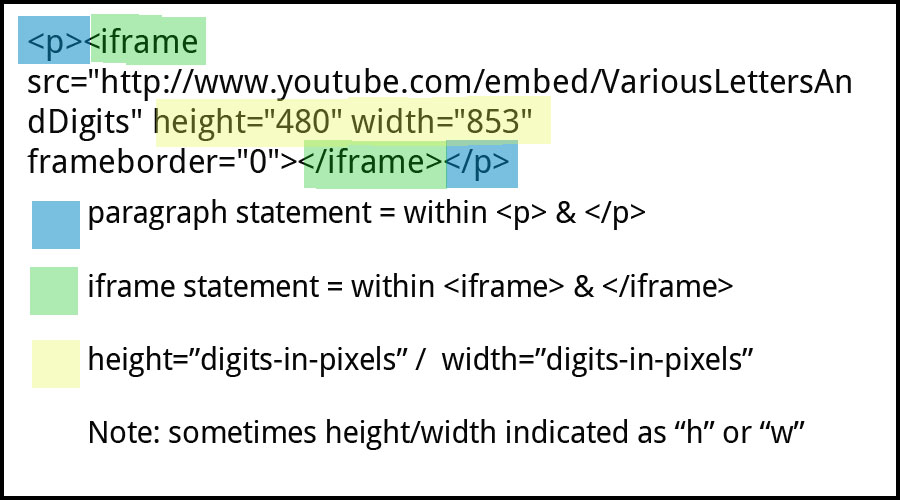
In the example shown above the video has the following dimensions; the height is 480 pixels and the width is 853 pixels. The size of photos are denoted in exactly the same way. In order to correctly size videos or pictures you will want to use the following steps:
-
Determine the aspect ratio of the current image or video file.
The actual calculation for aspect ratio is:
“width / height = aspect ratio”
Example we would get: “853 / 480 = 1.777” which we would then round to 1.78. -
The next step would be to determine either the new width or new height that we want the image or video to be on the page. This would probably be determined by the location where we want the image or video to reside on the web page.
-
If we are setting the new width of the photo or video we would use the following formula to calculate the size of the new height:
“new width / aspect ratio = new height”
If for example we determine that the new width of the video needs to be 400 pixels wide we would calculate the new height needed to be: “ 400 / 1.78 = 224.719 ” which we would round up to 225 pixels. -
If we are setting the size for the new height instead for the video we would use the following formula to calculate the new video width:
“new height * aspect ratio = new width”
Based upon the example above if we set the new height at 350 pixels the new width would need to be:
“350 * 1.78 = 623” or 623 pixels wide.
Now that we have all of the numbers we need we will need to go into the HTML code and modify both the width and height in order for the video or images to display correctly.
What is Search Engine Visibility and should I care about this?
Search Engine Visibility or Search Engine Optimization can be a powerful online marketing strategy. Search engines such as Google, Yahoo, and others are the main way that internet users discover websites.
You might already have a way to reach out to provide your website address to your customers or others you wish to visit your site. If you are confident about your existing networking mechanism you may not care about this. However most of us do not and SHOULD care about Search Engine Visibility!
Typically a user goes to Google and types your name or other keywords to expecting to get a short list of websites to view. Often if your site doesn't show up in the first page they won't bother looking further! Given that Google is searching for those keywords from literally millions of sites containing billions of pages, this first appears to be a daunting task. It is possible to be found and listed on the first page, but you need to work on it! If you are not convinced, try a google search on "used websites". We are a small website business but when we search this term Google often lists Fred's Used Websites as the first entry of the first page!
Since late 2010, search engines are giving higher priority to local search. This is an important change for small local business and critical if you are a brick and morter business! Simply stated, if the search engine has a physical address associated with your website, it will get preference in the search results when the person searching is physically nearby --or-- when they include a locality (city and state) in the search term. If this matters to you, make sure you have your business name, phone number, and address visible on every page of your site. You should also claim your local business (i.e. Google Places).
What is a Site Map Page and why do I want one?
A site map page is simply a single page on your site that provides your visitor an overview of your site in a single glance. If you have a small site with only a few pages, you don't need a site map page -- it would be overkill to dedicate an entire page to repeating what you already have on your navigation links. However if you have a large number of pages you will need to organize your site in a heirarchical manner. It can be hard for your site visitor to find a particular page they have seen while browsing.
Imagine yourself browsing a website that not only sells but has useful information about teas. You were browsing and found an interesting page on the history of Oolong teas that you clicked because you were looking at a particular oolong product. Later you try to find this page again and get frustrated poking all around the site trying to remember what sequence of pages led you to this in the first place. The answer is the site map page. A quick scan of the outline of the site pages should help you quickly get back to that page!
If you care about search engine visibility for your site, Google says the following in their Webmaster Guidelines.
"Offer a site map to your users with links that point to the important parts of your site."
"Following these guidelines will help Google find, index, and rank your site."
If you DO decide to have a site map you should have the link to it in a prominent place such as on your main navigation links. If visitors can't find the map page it will be of little use.
It can take a lot of extra work to make sure that a website's site map page is accurate. If you have an average site, you or your webmaster will need to carefully review every page and make sure that it is listed and in the right heirarchy on the site map page -- and that you have removed any links to pages you have deleted! However, if your site is hosted on Fred's Used Websites, your site map page is always dynamically generated and always reflects the current layout of your site.
What is a WYSIWYG Editor?
WYSIWYG is an acronym for What You See Is What You Get. A WYSIWYG Editor is one that allows you to see the format of your web content while you are editing it.
Most computer users today have come to rely on applications such as Microsoft Word to format documents for printing. When you have a document open for editing, you can see what it will look like when printed. Likewise an HTML editor for a website can present you with what you will see rather than the raw HTML.
Consider this: "A formatted section of text that contains things such as BOLD, italics,font size, underline, color, or combinations of these can be pretty complicated in HTML". The HTML for this is:
"A formatted section of text that contains things such as BOLD, italics, font size, underline, color, or combinations of these can be pretty complicated in HTML"
Once upon a time you needed a webmaster just to manually format your pages. Now webmasters use applications such as Dreamweaver to format text for a webpage. You could use applications such as this yourself if you wish to spend the money on this to maintain your website.
We offer a better alternative. You can edit the content of your web pages hosted on Fred's Used Websites with a WSYIWYG editor from any computer using only a web browser! You can try this out now by going to our sample edit page.
What is an e-mail client and how does that relate to webmail
An e-mail client is an application that runs on your computer. E-mail clients typically download e-mail messages from the mail server using POP3 and send mail through the mail server using SMTP. Examples of e-mail clients are Microsoft Outlook, Mozilla Thunderbird, Apple Mail, etc. Many people prefer to use an e-mail client because you can usually set them up to access multiple e-mail accounts simultaneously.
Webmail is a method to access your e-mail account through a web browser. In the past these were not nearly as sophisticated as the e-mail clients and were used only as a backup way to get to your e-mail. There are several webmail applications now like Gmail and Yahoo that are very sophisticated and can even be configured to access multiple e-mail accounts just like the e-mail clients. Examples of webmail are Gmail, Yahoo mail, Hotmail, etc.
How do I setup an e-mail client (Outlook, Thunderbird, etc) with my e-mail Account
For specific instructions on how to set up your specific mail client, you should look for help on that particular mail client. The mail server at Fred's Used Websites is capable of all the default methods for reading and sending e-mail (POP3, SMTP, IMAP) and with/without connection security (SSL/TLS, STARTTLS). Your mail client should offer defaults for the port numbers and if you use them you should have no trouble at all. NOTE: POP3 or IMAP is frequently referred to as the Inbound or Incoming server. SMTP is frequently referred to as the Outbound or Outgoing Server.
You should always use the following when setting up your client
- POP/IMAP (Incoming) Server - fredsusedwebsites.com
- SMTP (Outgoing) Server - fredsusedwebsites.com
- Account name - your full e-mail address (i.e fred@fredsusedwebsites.com)
It will work to use your own website domain as the server (i.e. mail.usefulmediaplanet.com) but you must remember that if you also want a secure connection, you will get a warning about a certificate that doesn't match the domain. Just ignore the warning and accept the certificate and this type of connection will work also.
We have experienced trouble with some network providers such as Comcast, Qwest, COX, Charter, etc. In an attempt to control the sending of SPAM from their networks, they often block port 25 (the main SMTP port for sending e-mail) to any provider other than their own SMTP servers. Usually there is nothing you can do about this other than just using that SMTP server instead of fredsusedwebsites.com. We do have one non-standard port open (port 26) to work around this problem. Frequently just changing the port from 25 to 26 will enable you to send messages with fredsusedwebsites.com.
NOTE: When setting things up, many e-mail clients will suggest an account name which is just the name part of your e-mail (stripping off the @ sign and everything following). This will NOT work in our environment. You must always use your full e-mail address as your account name.
How do I get my new smart phone to sync with my webmail?
Use FredsUsedWebsites.com for both the POP or IMAP (Incoming) and SMPT (Outgoing) servers. Be sure it is not mail.FredsUsedWebsites.com. Smart phones typically are configured NOT to remove the mail from the mail server by using IMAP or by configuring POP to leave messages on the server. You can later download and remove messages from the server using an e-mail client.
It is worth noting again here, since this is a very common error:
Many e-mail clients will suggest an account name which is just the name part of your e-mail (stripping off the @ sign and everything following). This will NOT work in our environment. You must always use your full e-mail address as your account name.
How can I access my e-mail from a browser (webmail)?
You can access your e-mail using your web browser using our webmail client. Just go to http://webmail.fredsusedwebsites.com and enter your e-mail information into the login box there. Remember that as with the e-mail clients you must enter your full e-mail address in the "username:" field.
Our e-mail client is feature rich but not quite what you can do with gmail or yahoo. If you want something more sophisticated than our mailer, we suggest that you use gmail. You can get a gmail account and then use that account to read/send mail from other accounts. Be sure to use the same server and configuration setting as yo would in setting up an e-mail client (above)
